How to Make a Lyric Video on iPhone
Creating a lyric video used to require professional video editing software and hours of manual work. Today, you can make a high-quality lyric video directly from your iPhone in just a few minutes.
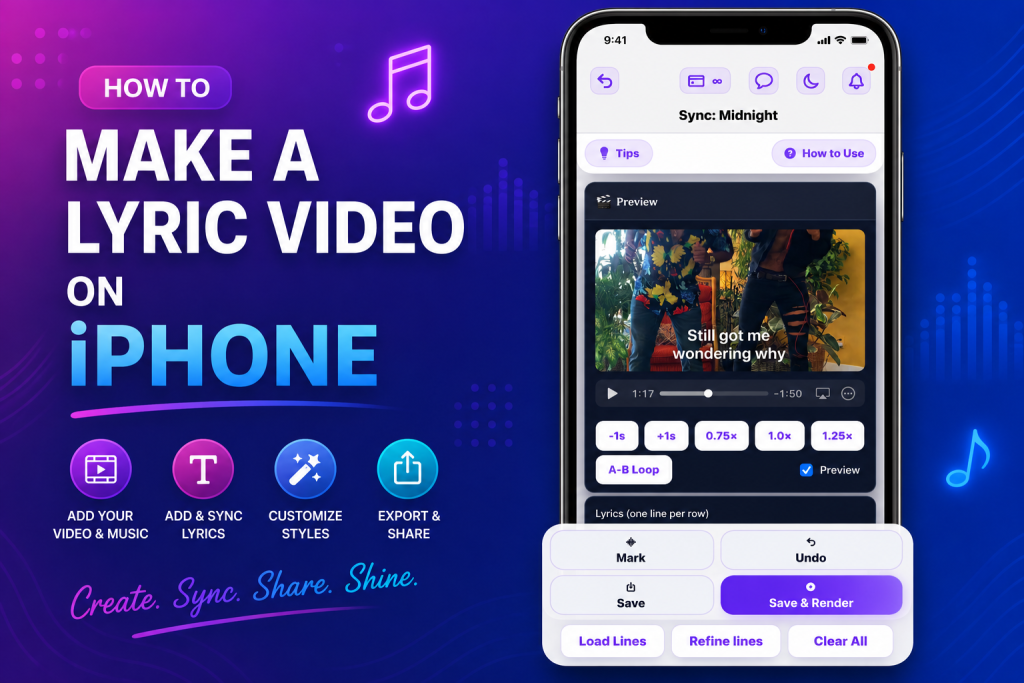
Whether you’re an independent artist, content creator, YouTuber, or someone who wants to share music on TikTok or Instagram, an iPhone is all you need to create engaging lyric videos.
In this guide, you’ll learn how to make a lyric video on iPhone using the fastest method, plus tips for creating videos that look professional.
📱 Why Create Lyric Videos on iPhone?
There are many reasons creators prefer using an iPhone:
- Edit anywhere
- No computer required
- Faster workflow
- Easy sharing to TikTok, Instagram, and YouTube
- Save time with automatic lyric syncing
Instead of manually timing every lyric, modern apps can synchronize your lyrics with the song, reducing editing time significantly.
🎵 What You’ll Need
Before you begin, prepare:
- An iPhone
- Your audio file
- Song lyrics
- A lyric video app
- A stable internet connection for uploading and exporting
If you don’t already have lyrics, some apps can generate them automatically.
📥 Step 1: Download VizMigo
Click over here to get VizMigo on your iPhone/iPad.
After that:
- Open VizMigo app
- Create your account
After that, you are ready to create your first lyric video.
⬆️ Step 2: Upload Your Song
Tap Upload.
Choose the music file you want to use from your iPhone.
After uploading, VizMigo prepares your project for lyric synchronization.
✍️ Step 3: Add Your Lyrics
You have two options.
📋 Option 1: Paste Lyrics
If you already have your lyrics, simply paste them into the editor.
🤖 Option 2: Generate Lyrics
If you don’t have the lyrics available, VizMigo can generate them for you, saving time and reducing manual work.
This makes it easier to start your project without switching between different apps.
🎯 Step 4: Sync the Lyrics
Once the lyrics have been added, sync them with your song.
Accurate synchronization is one of the most important parts of a lyric video because viewers expect the words to appear at the right moment.
If you’re interested in learning more about synchronization, read our guide on how to sync lyrics with music.
🎬 Step 5: Export Your Video
When you’re satisfied with the timing:
- Export the project
- Wait for processing to finish
- Download your finished lyric video
Your video is now ready for YouTube, TikTok, Instagram Reels, Facebook, or any other platform.
⚡ Why Automatic Sync Saves Time
Traditional video editors require you to manually move every lyric line frame by frame.
For a four-minute song, this can take several hours.
Automatic lyric syncing helps speed up the process by matching lyrics to your audio, allowing you to spend more time creating content instead of editing timestamps.
💡 Tips for Better Lyric Videos
🎧 Choose High-Quality Audio
Always upload the highest-quality audio available.
Poor audio quality can affect the overall viewing experience.
✅ Check Your Lyrics
Review your lyrics before exporting.
Correct spelling and punctuation improve professionalism.
🔤 Keep the Text Readable
Choose fonts and colors that are easy to read against the background.
Avoid using overly decorative fonts.
👀 Preview Before Exporting
Watch the full video once before exporting.
Look for:
- Timing issues
- Missing words
- Spelling mistakes
- Formatting problems
A quick review can prevent having to export the project again.
🌍 Where Can You Upload Your Lyric Video?
After exporting, you can upload your lyric video to platforms including:
- YouTube
- TikTok
- Instagram Reels
- X
- Snapchat
Many creators also use lyric videos to promote new music before releasing an official music video.
💰 Can You Monetize Lyric Videos?
Whether a lyric video can be monetized depends on who owns the music and lyrics.
If you own the rights to the content, monetization is generally possible. If you’re using copyrighted music owned by someone else, you may need permission or a license.
Learn more in our article can I monetize lyric videos on YouTube.
You should also understand copyright rules before publishing. Read do lyric videos get copyrighted for a detailed explanation.
🚀 Are Lyric Videos Still Worth Making?
Yes.
Lyric videos continue to perform well because they help audiences follow along with songs while increasing engagement.
Artists often release lyric videos before the official music video to build anticipation.
If you’re wondering whether they’re still effective, check out are lyric videos worth it?
🎉 Conclusion
Making a lyric video on an iPhone has never been easier. With the right app, you can upload your song, add or generate lyrics, sync them with the music, and export a professional-looking lyric video without needing a computer.
Whether you’re promoting your own music or creating engaging social media content, a streamlined workflow helps you spend less time editing and more time publishing.
If you’re ready to get started, download VizMigo from the App Store, create an account, upload your song, add or generate lyrics, sync them, and export your finished lyric video in just a few steps.